BMI Calculator in Java
BMI Calculator in Java
Overview
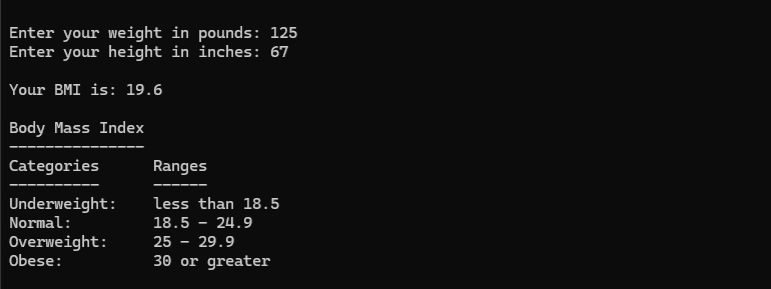
This Java console program prompts the user to enter their weight (in pounds) and height (in inches), then calculates their Body Mass Index (BMI) and displays the category.
The output is formatted to one decimal place to match standard BMI ranges.
Features
- Uses
Scannerfor input - Converts imperial units to metric
- Applies BMI formula:
weight (kg) / height² (m²) - Displays result with formatted decimal output
- Aligns BMI ranges for readability
Code Implementation
1
2
3
4
5
6
7
8
9
10
11
12
13
14
15
16
17
18
19
20
21
22
23
24
25
26
27
28
29
30
31
32
33
34
35
36
37

import java.util.Scanner;

public class BMI_Calculator {
    public static void main(String[] args) {
        double bmi;
        double weightPounds;
        double heightInches;
        double weightKg;
        double heightMeters;

        try (Scanner input = new Scanner( System.in )) {
            System.out.println( "\n\n" );
            System.out.print("Enter your weight in pounds: ");
            weightPounds = input.nextDouble();
            System.out.print("Enter your height in inches: ");
            heightInches = input.nextDouble();
            weightKg = weightPounds * 0.45359237;
            heightMeters = heightInches * 0.0254;

            bmi = weightKg / (heightMeters * heightMeters);

        System.out.printf("\nYour BMI is: %.1f\n", bmi);
        System.out.println("\nBody Mass Index");
        System.out.println( "---------------" );
        System.out.println("Categories      Ranges");
        System.out.println("----------      ------");
        System.out.printf("%-15s %s\n", "Underweight:", "less than 18.5");
        System.out.printf("%-15s %s\n", "Normal:", "18.5 - 24.9");
        System.out.printf("%-15s %s\n", "Overweight:", "25 - 29.9");
        System.out.printf("%-15s %s\n", "Obese:", "30 or greater");
        System.out.println( "\n\n" );
        } catch (Exception e) {
            System.err.println("Error reading input: " + e.getMessage());
        }
    }
}
Sample Output
Notes
- System.out.printf is used here to cleanly control decimal output
- Variables were declared clearly and spaced logically for readability
- Considered consistent indentation and header comments